Reels GUIDE
Instagram has no documented universal switch to remove Reels. These controls reduce recommended content in your Home feed.
Switch to Following
- Open your Home feed.
- Tap the Instagram name or feed selector at the top left.
- Choose Following. Reopen this view when you want posts from accounts you follow.
What this does
Following removes suggested posts from that view. Reels posted by accounts you follow can still appear, and the Reels tab remains.
Pause suggested posts
- Find a suggested post in Home.
- Tap its ×, or open ⋯ → Not interested.
- Choose Snooze all suggested posts for 30 days, if offered.
- Repeat when the 30 days end.
What this does
This pauses suggested posts in Feed. It does not disable Reels, Explore, ads or videos from accounts you follow.
SEE WHAT TO LOOK FOR
Screenshots
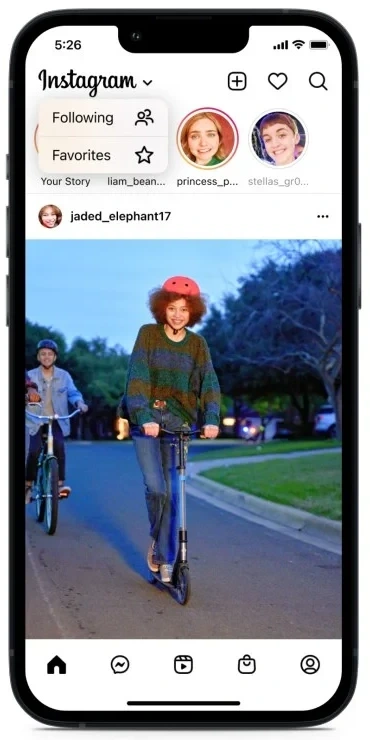
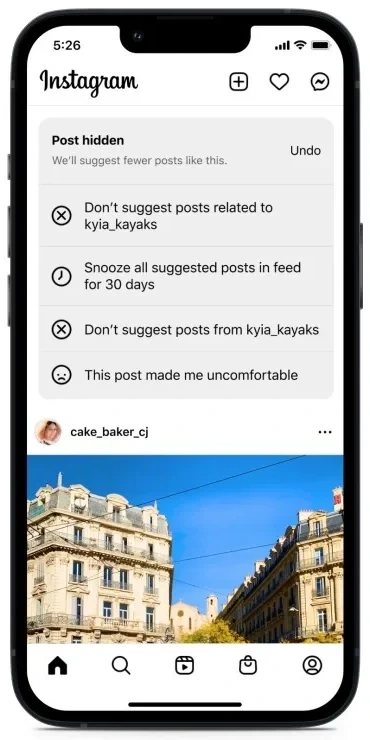
Official Instagram illustrations of the app, published by Meta in 2022. Cropped to the relevant phone screens. Current layouts and wording can differ. Image source ↗
Sources
Help pages checked 18 November 2026. These are documented instructions; not every mobile app was tested on a device.